DNS
Settings
If you do not host your domain with luckycloud, a few entries need to be set up in the DNS of your domain.
Please note: To add an existing domain, a so-called site verification token must first be entered in the domain's DNS settings.
To view the site verification token, please click on Manage & Pay in your luckycloud dashboard and then select "Own Domains" in luckycloud Mail.
Follow these steps to use your domain with luckycloud.
MX, DKIM, DMARC, Auth & SPF
Add these entries and you're done!
Contact your domain provider for this.
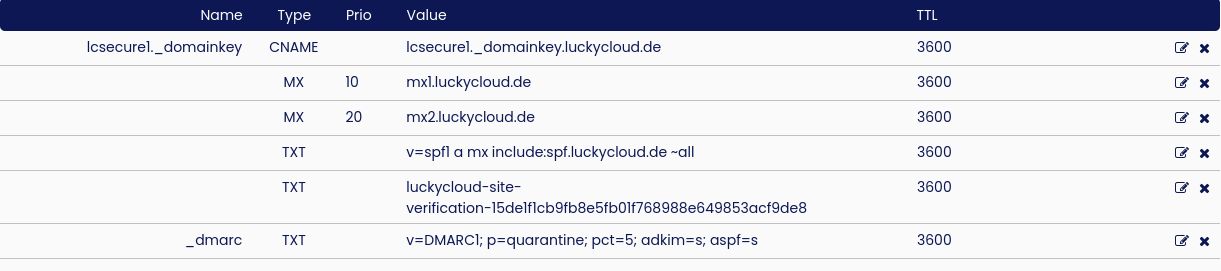
| Type | Hostname / Prefix | Value | Prio | Usage |
|---|---|---|---|---|
| MX | mx1.luckycloud.de | 10 | MX1 | |
| MX | mx1.luckycloud.de | 20 | MX2 | |
| CNAME | lcsecure1._domainkey | lcsecure1._domainkey.luckycloud.de. | ----- | DKIM |
| TXT | _dmarc | v=DMARC1; p=quarantine; pct=5; adkim=s; aspf=s | ----- | DMARC |
| TXT | v=spf1 a mx include:spf.luckycloud.de -all | ----- | SPF | |
| TXT | Site Verification Token - Dashboard | ----- | AUTH |
Example for inwx.com